This guide is part of our series on AI for SEO reporting and analytics.
SEO reports often celebrate traffic that never turns into a lead or a sale. Conversion path analysis looks at which pages bring visitors who go on to call, fill in a form or buy, and which bring visitors who leave. GA4 holds the data, but its reports make it hard to see the whole picture across hundreds of landing pages. AI can sort the pages, spot the patterns and suggest what to change.
What you need
- GA4 with key events set up for the actions that matter to the business: form submissions, phone clicks, purchases, booking requests
- Google Search Console, for the queries that bring visitors to each page
- An AI assistant that reads CSV files, such as Claude
If key events are not set up correctly, fix that first. An analysis built on missing or double-counted events will point you the wrong way. Test each event in GA4’s DebugView before relying on the numbers.
Step 1: Export landing page performance
In GA4, go to Reports > Engagement > Landing page (or build a free-form exploration). Filter to the organic search channel and export for the last 3 to 6 months:
- Landing page
- Sessions and engaged sessions
- Average engagement time
- Key events, by event name
- Session key event rate
- Revenue, for ecommerce sites
Use a long enough period that pages with modest traffic have a fair sample. A page with 40 sessions and no leads may simply be unlucky.
Step 2: Have the AI sort pages into groups
Attached is GA4 organic landing page data for the last 6 months with sessions,
engaged sessions, engagement time, key events by name, and session key event
rate.
1. Exclude pages with fewer than 100 sessions.
2. Calculate the site's median sessions and median session key event rate.
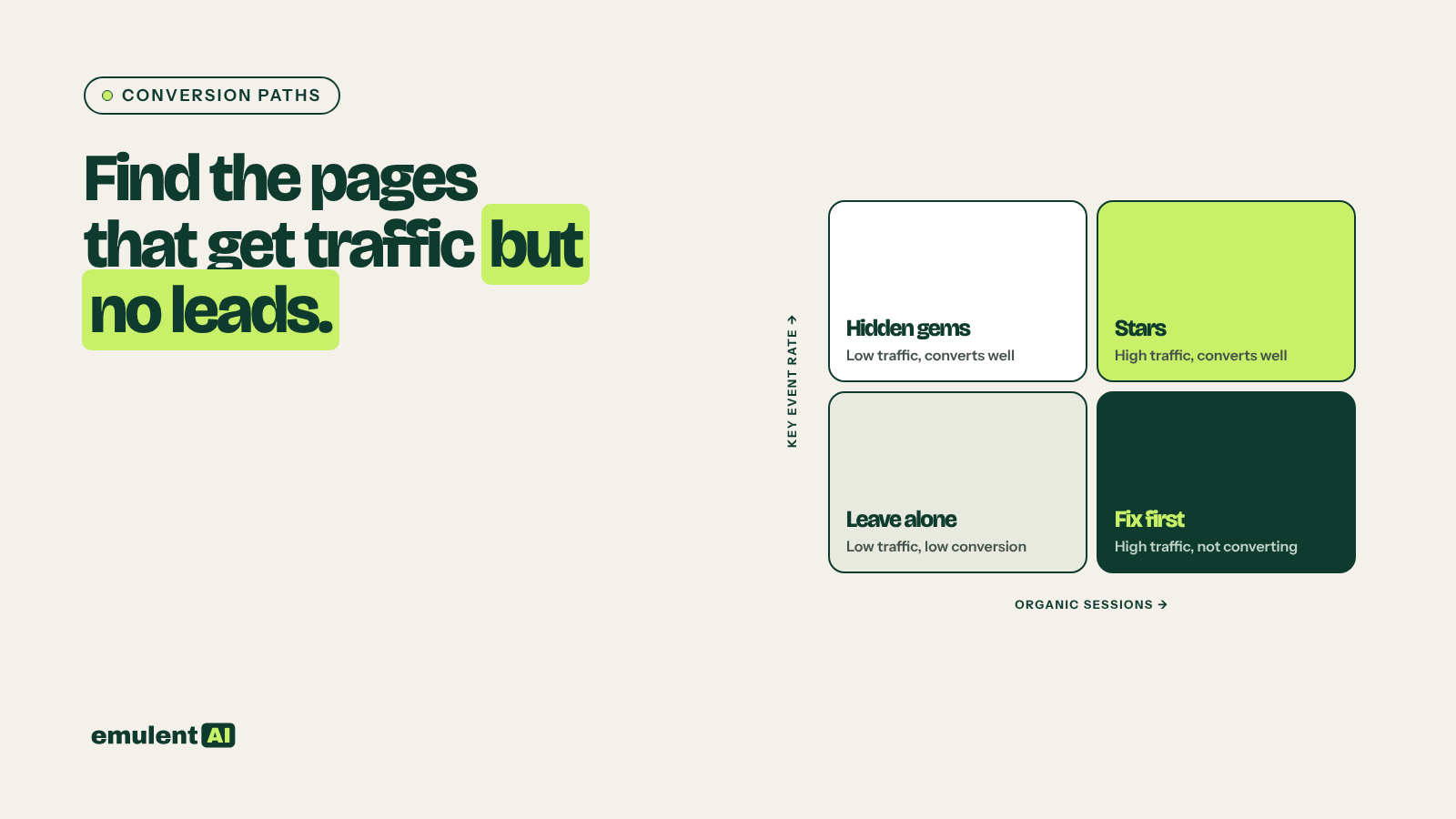
3. Sort every page into one of four groups:
   - High traffic, converting: above median on both
   - High traffic, not converting: above median sessions, below median rate
   - Low traffic, converting: below median sessions, above median rate
   - Low traffic, not converting: below median on both
4. For each group, list pages with their numbers, sorted by sessions.
5. Calculate how many extra key events the high traffic, not converting pages
   would bring at the site median rate.
Show formulas. Output CSV and a short summary per group.
Step 3: Read what each group needs
| Group | What it usually means | What to do |
|---|---|---|
| High traffic, converting | Your best pages | Protect them: watch rankings closely, keep them current, link to them from other pages |
| High traffic, not converting | Visitors arrive but do not act | Check intent and the path to the next step; this group usually holds the fastest gains |
| Low traffic, converting | Pages that work but few people find | Improve their rankings: better titles, more internal links, content updates |
| Low traffic, not converting | Pages doing little | Merge, improve or accept as supporting content |
Some high-traffic pages are not supposed to convert directly. An informational blog post may introduce people who come back later and buy. Check GA4’s Advertising > Attribution > Conversion paths report, which shows the channels people touch before a key event, and a path exploration starting from the blog post, before judging it.
Step 4: Diagnose the high-traffic, non-converting pages
For the top 10 pages in that group, export their Search Console queries and give the AI the page content too:
This page gets [x] organic sessions a month and converts at [y]%, against a
site median of [z]%. Attached are its top queries and the page content.
1. What intent do the queries show (learning, comparing, ready to buy, looking
   for a local business)?
2. Does the page offer a next step that fits that intent? Where does it
   appear on the page?
3. Is there a mismatch between what the queries ask for and what the page
   delivers?
4. Suggest up to 5 changes, such as a call to action that fits the intent, a
   link to a service page, a lead magnet, a phone number placement, or a
   rewrite of the opening.
Common findings: a blog post ranking for a buying query with no link to the service page; a service page with the contact form only at the very bottom; a page whose queries show people want prices, and no prices or price range on the page.
Step 5: Make changes and measure
Change a few pages at a time so you can tell what worked. Note the date and the change. After 4 to 8 weeks, rerun step 2 for the changed pages and ask the AI to compare key event rate before and after. Add the results to the next monthly client report, where business results belong at the top.
If a page that used to convert well suddenly stops, check tracking before content. A broken form, a changed thank-you page URL or a consent banner update can make it look as if visitors stopped acting. Our guide to investigating traffic drops includes a tracking checklist.
Put this to work with Bill.
Send Bill your exports and tell him what you are trying to fix. He’ll tell you which of these workflows to run first.
Contact Bill directly
Or call 773-791-3197