This guide is part of our series on using AI for local SEO.
Programmatic local pages are service-in-town pages built from a template and a data set instead of written one at a time. Done well, they put a useful page in front of someone searching “gutter cleaning Rolesville.” Done badly, they are the exact pattern Google’s spam policies describe, and they can drag down the rest of the site.
Google’s spam policies (updated August 28, 2026) list pages aimed at specific cities that funnel visitors to one page as doorway abuse. The same page defines scaled content abuse as producing many pages to manipulate rankings without helping users, and names AI-generated pages that add no value as one example. It also lists blocks of text naming the cities a page wants to rank for as keyword stuffing. So every page has to pass one test: would someone in that town learn something here they would not learn on the page for the next town?
What you need
- An AI assistant that accepts file uploads, such as Claude
- A list of service and town pairs with demand, ideally from a local competitor gap map
- Job records from your CRM or field service software, with town and job type
- Reviews and project photos tagged by town
- WordPress with a page builder template, and a staging site for testing
- Google Search Console
Step 1: Decide which pages deserve to exist
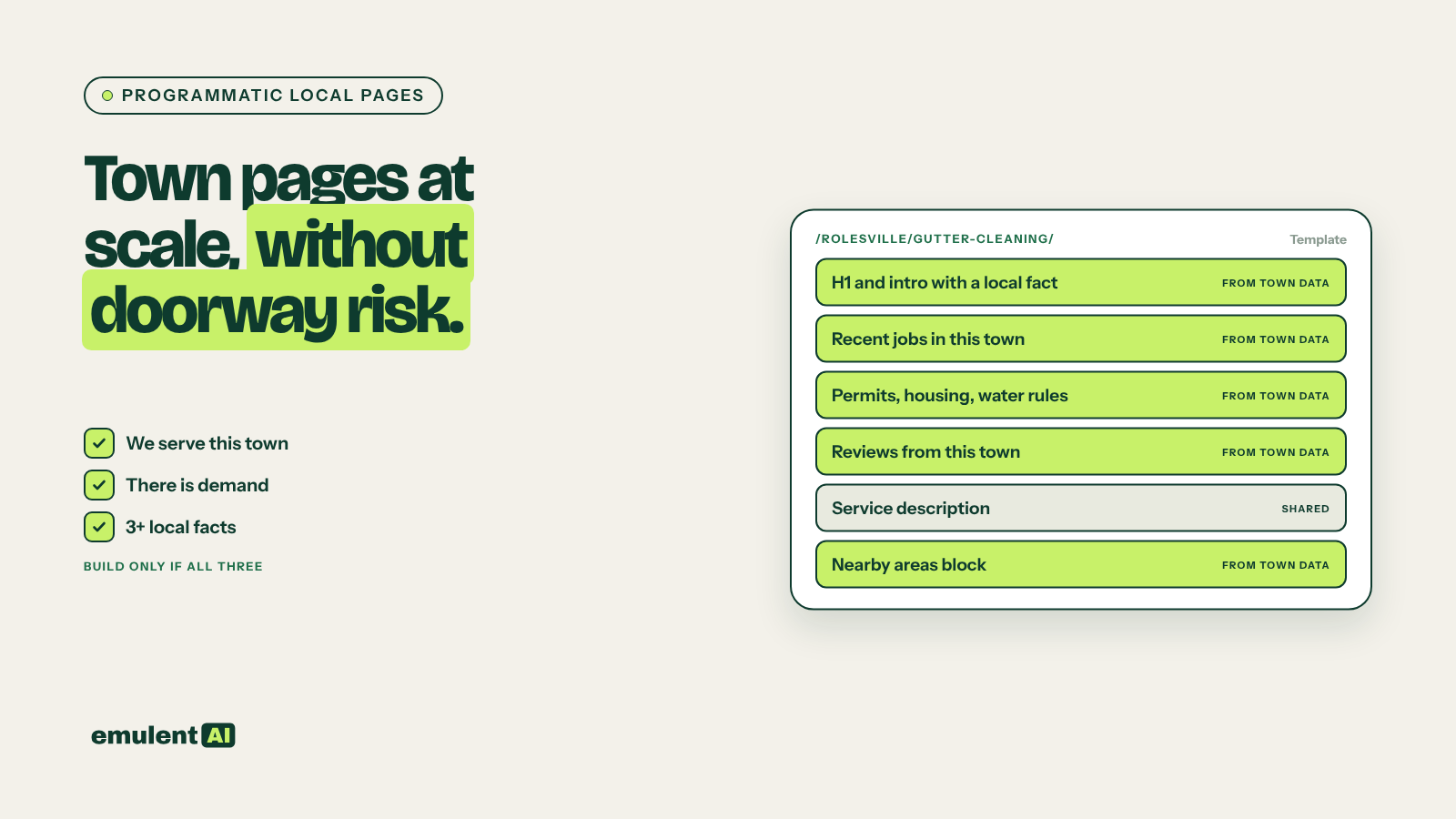
Start from demand, not from every possible service and town combination. A page qualifies only if all of these are true:
- The business really does that service in that town, with staff who go there
- There is search demand, or a competitor ranks with a dedicated page for that pair
- You have at least three facts specific to that town and service to put on the page
Ask the AI to apply the filter:
Attached are our service and town demand list, our location sheet and a town
facts sheet. For every service and town pair, mark it BUILD only if (a) the
location sheet shows that service is offered from a location serving that town,
(b) the demand list shows search volume or a ranking competitor page, and
(c) the town facts sheet has 3 or more facts for that town relevant to the
service. Mark the rest SKIP with the reason. Output CSV.
The SKIP list is not wasted. Those towns still get named on the parent location page as places you serve, written in a sentence. That is how most small towns should be covered.
Step 2: Collect real local data for each town
This step is the difference between a useful page and a doorway. For each BUILD town, gather facts that change the service or the buying decision. For a home services business:
- Jobs completed in that town in the last 12 months, with neighborhoods and job types
- Reviews from customers in that town, with permission to quote them
- Project photos taken in that town, with a short description of each job
- Permit rules from the town or county website, such as whether a water heater replacement needs a permit and what it costs
- Housing details that change the work: typical age of homes, common pipe materials, HOA rules, well water versus municipal water
- Typical response time or drive time from the nearest location
- Any town-specific pricing factors
AI can help collect public facts, for example by reading a town’s permit page and summarizing the rules. Record the source URL for every public fact in the sheet, because a person needs to check it before it goes on a page.
Step 3: Build a template with fixed and variable parts
Design one page template where the variable parts carry most of the value:
- H1 and intro written for that town and service, with a real local detail in the first two sentences
- Recent jobs in that town, from the CRM data, with photos
- Local factors: permits, housing stock, water, HOA rules, whatever applies there
- Reviews from customers in that town
- Pricing guidance and what affects cost locally
- The service description, which can be shared across towns but should stay short
- A nearby areas block linking to the same service in two or three neighboring towns, following your location and service linking map
- A contact block with the local phone number and the nearest location’s address
In WordPress, build this as a saved page template (a block pattern or a page builder template) with each variable section in its own clearly labeled section. For larger sets, store each town’s data in custom fields and use WP All Import to create the pages from a CSV. Build and test the first batch on a staging site before pushing it live. Kinsta includes one-click staging environments for this.
Step 4: Write each page from its own data
Write the variable sections for the [service] page for [town] using only the
attached row of town data. Rules:
- Every claim must come from the data row. If a section has no data, write
  SKIP SECTION instead of filling it.
- Open with the most specific local fact, not a general statement about the
  service.
- Do not mention any other town except in the nearby areas block.
- Do not repeat sentences or sentence structures from the attached example
  page for [other town].
- 400 to 700 words across the variable sections.
After the draft, list each factual claim with the data column it came from.
The claim list at the end makes review fast. The editor checks each claim against its source column instead of rereading every sentence.
Step 5: Check uniqueness before publishing
Run a similarity check across the batch. Ask the AI to compare every page against every other page in the set and report the share of overlapping sentences, or use the near-duplicates report in Screaming Frog. As a working rule, if two pages share more than about 30 percent of their body text outside the service description, the weaker page needs more local data or should not be published.
Then a person reads every page before it goes live. For a batch of 30 pages that is a few hours of work, and it catches the wrong permit fee or the review quoted from the wrong town.
Step 6: Launch in small batches
- Publish 10 to 15 pages, linked from their parent location pages and parent service pages.
- Submit the URLs in Search Console and wait four to six weeks.
- Check indexing in the Search Console Pages report, plus impressions and calls by page.
- If most pages are indexed and getting impressions, publish the next batch. If many sit in “Crawled, currently not indexed,” Google is telling you the pages are not different enough. Add data before you add pages.
Step 7: Prune what does not work
After six months, list every programmatic page with fewer than 10 impressions a month and no conversions. Add real local content, merge the page into its parent location page with a 301 redirect, or remove it. A smaller set of strong pages does better than a large set where half the pages are dead weight.
Put this to work with Bill.
Tell Bill which locations and towns matter most to you. He’ll tell you which of these workflows to run first.
Contact Bill directly
Or call 773-791-3197